Why make a poster?

The canvas is the argument.

A poster forces you to do something that most academic writing avoids: communicate visually. When you have a fixed canvas—36 by 24 inches, say—you can’t hide behind long paragraphs or exhaustive footnotes. You have to decide what matters most, how to say it clearly, and how to make someone walking by stop and look.

That constraint is the point. The brainstorming, sketching, and rearranging that goes into a poster reveals things about your argument that writing alone never does. What’s the core question? What’s the one image that anchors the whole thing? Which details are essential and which are filler? These are design questions, but they’re also intellectual ones.

Humanities posters are different from the dense, data-heavy posters common in the sciences. A humanities poster should invite people in—through a striking image, a provocative question, or a visual structure that makes someone curious enough to read further and start a conversation. The poster isn’t the paper. It’s the hook.

For more on why posters belong in humanities scholarship, see Consider the Poster.
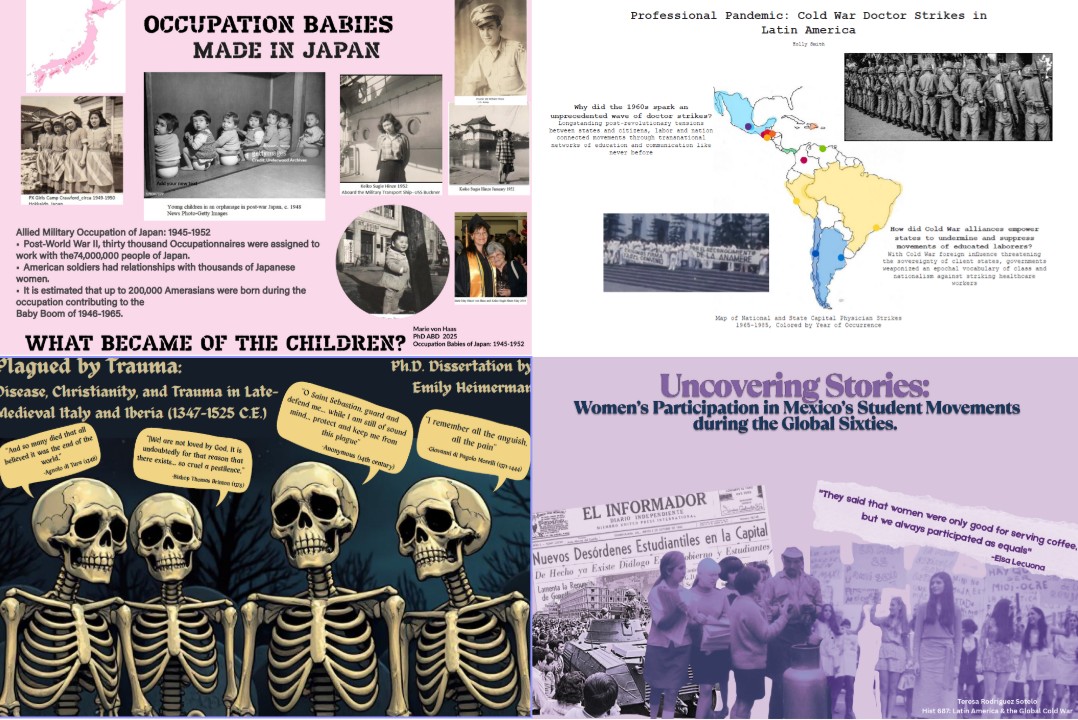
Student posters from Amaranth courses. Notice how each uses different visual strategies---dominant images, bold typography, color palettes---to draw you in.
Student posters from Amaranth courses. Notice how each uses different visual strategies—dominant images, bold typography, color palettes—to draw you in.

Design is a decision, not decoration

You don’t need a design background to make a good poster. But a handful of core principles—borrowed from design thinking and adapted for humanities work—can transform a cluttered draft into something that actually communicates.

Visual hierarchy

Hierarchy is about guiding the viewer’s eye. Not everything on your poster is equally important, and your design should make that obvious. The title should be the first thing people read from several feet away. A key image or question should pull them closer. Supporting details come last.

Ask yourself: if someone glances at your poster for three seconds, what do they see? If the answer is “a wall of text” or “lots of boxes” your hierarchy needs work. Make important things big. Make secondary things smaller. Use whitespace to separate them.

Alignment + Proximity

Alignment and proximit create order. When elements on your poster share a common edge or centerline, or when they are closer to each other than other things, the whole composition feels intentional rather than scattered. Misaligned elements—a title slightly off-center, text blocks at inconsistent margins—create a subtle sense of disorder and unease if not confusion.

Pick an alignment strategy and commit to it. Left-aligned text with consistent margins is a strong default. Center-aligned can work for titles and short text, but a fully centered poster often looks like a wedding invitation.

Repetition

Repetition builds consistency. When you use the same font for all your headings, the same accent color for emphasis, and the same spacing between sections, you create a visual language that helps the viewer navigate your poster without thinking about it.

This is where most first-draft posters struggle—five different fonts, three different text sizes that don’t correspond to any hierarchy, colors chosen at random. Pick two fonts (one for headings, one for body text), one or two accent colors, and stick with them everywhere.

Embrace the process

The best way to start is not in PowerPoint or Canva—where it’s too easy to get locked in to whatever you dragged and dropped on the canvas—but on paper. Sketch a few rough layouts with boxes representing images and lines representing text. Experiemnt. Try your title at the top, then try it across the middle. Sketch out the visual hierarchy. See what happens when the main image takes up a quarter of the poster.

Once you have a layout you like, start to build it digitally. Interate. Again. And Again. Just try to clean up one little detail each time you look at it. If you can’t get something to feel right, it’s probably not that you’re missing a minor adjustment, but need to step back and rethink. Sketch again!

Canva, Google Slides, and PowerPoint all work for poster layout. When you’re ready to print, our poster printing guide walks through the process with the studio’s HP DesignJet printer.

The goal isn’t perfection. It’s intentionality and connection. It’s making something that communicates your ideas visually—and learning something about your own argument in the process.